

Wat betekent "Beveiligd" in de Netwerkopties?

Winder S
Apr 24, 2026

Als u de Netwerkopties in de Windscribe-instellingen verkent, kan de terminologie die we gebruiken voor netwerk-whitelisting verwarrend zijn.
Een netwerk kan in één van 2 modi zijn:
- Beveiligd – dit betekent dat Windscribe uw apparaat op dit netwerk zal beveiligen. Met andere woorden, de VPN zal op dit netwerk worden ingeschakeld
- Onbeveiligd – dit betekent dat de VPN uitgeschakeld is wanneer u verbonden bent met dit netwerk en niet beveiligd wordt door Windscribe
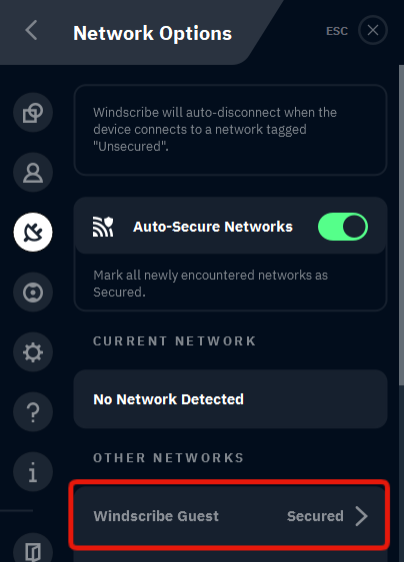
In de bovenstaande schermafbeelding is het Windscribe-gastnetwerk Beveiligd, wat betekent dat elke keer dat deze computer verbinding maakt met dat netwerk, de Windscribe-app de VPN inschakelt. Als dit was ingesteld op Onbeveiligd, zou de app de VPN uitgeschakeld houden op dat netwerk.
TIP: Wanneer Netwerken automatisch beveiligen is ingeschakeld, wordt elk nieuw netwerk dat u deelneemt automatisch gemarkeerd als Beveiligd.